Skip to content

Second Opinion: Team

Know what winning looks like in your own team.

Give your team the same short questionnaire your candidates take. Add your sales numbers. See which patterns go with success here, plan each person's development, and hire against your own evidence when there is enough of it.

For development and hiring, never for decisions about someone's job.

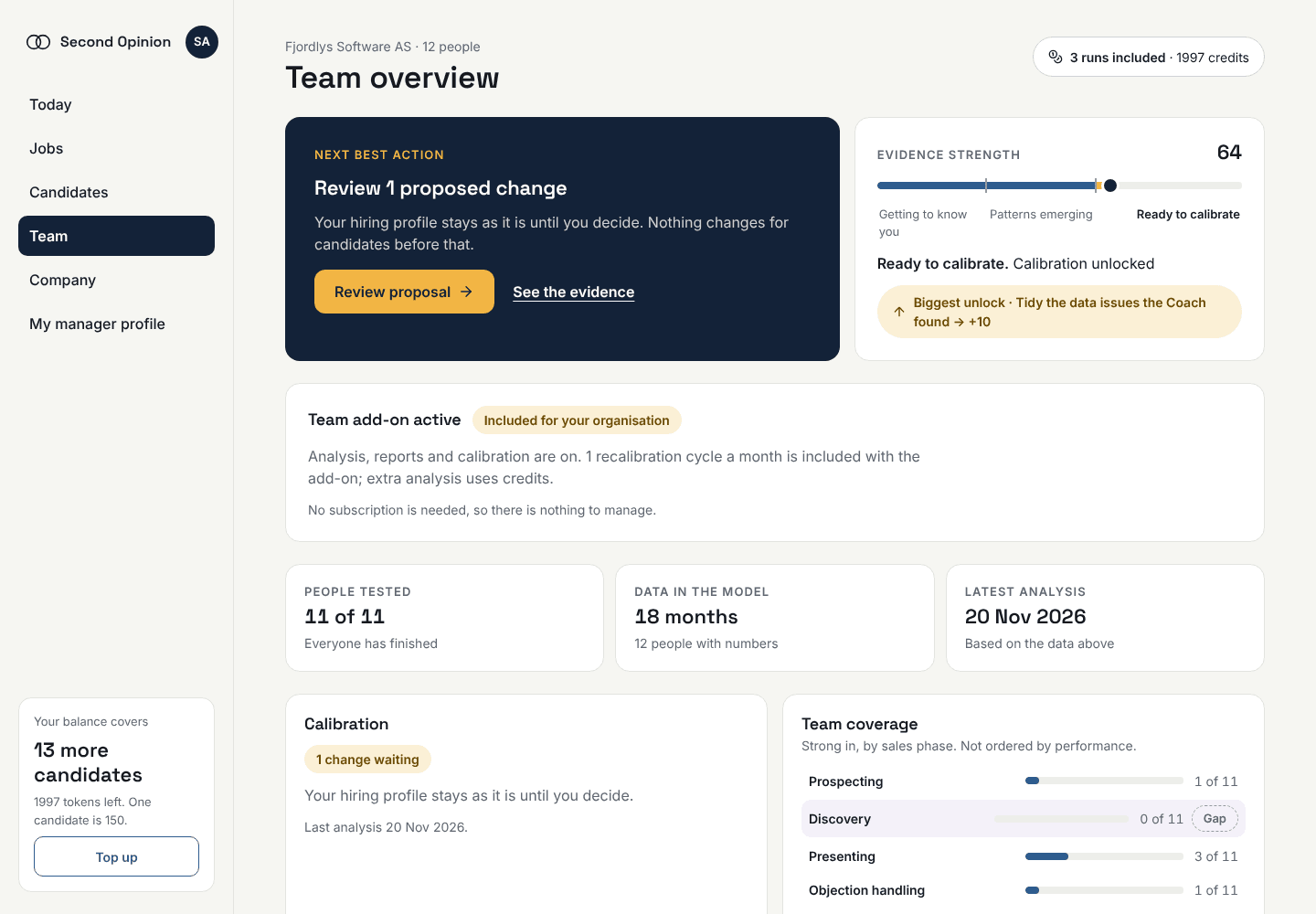
The Team overview for a fictional software company: the next step, Evidence Strength, how many people have answered, calibration and team coverage by sales phase.
Screens from the product with a fictional company, Fjordlys Software AS. The names and figures are invented.

A walk through Team

From a team questionnaire to a better hiring profile, step by step

Team runs alongside how you already hire with Second Opinion. These are the screens you work in, in the order you meet them.

Step 1 · Your team answers

Everyone takes the same questionnaire as your candidates

You switch Team on in four short steps: the purpose, what it must never be used for, your country's staff notice and a short checklist. Then you invite your team. Each person answers on their phone in about twenty minutes and gets their own development report straight away.

  • The person sees their strengths first, then two or three things to try
  • No scores, no performance figures and no comparisons with colleagues in their report
  • They can ask for access, object or ask for deletion from the report itself
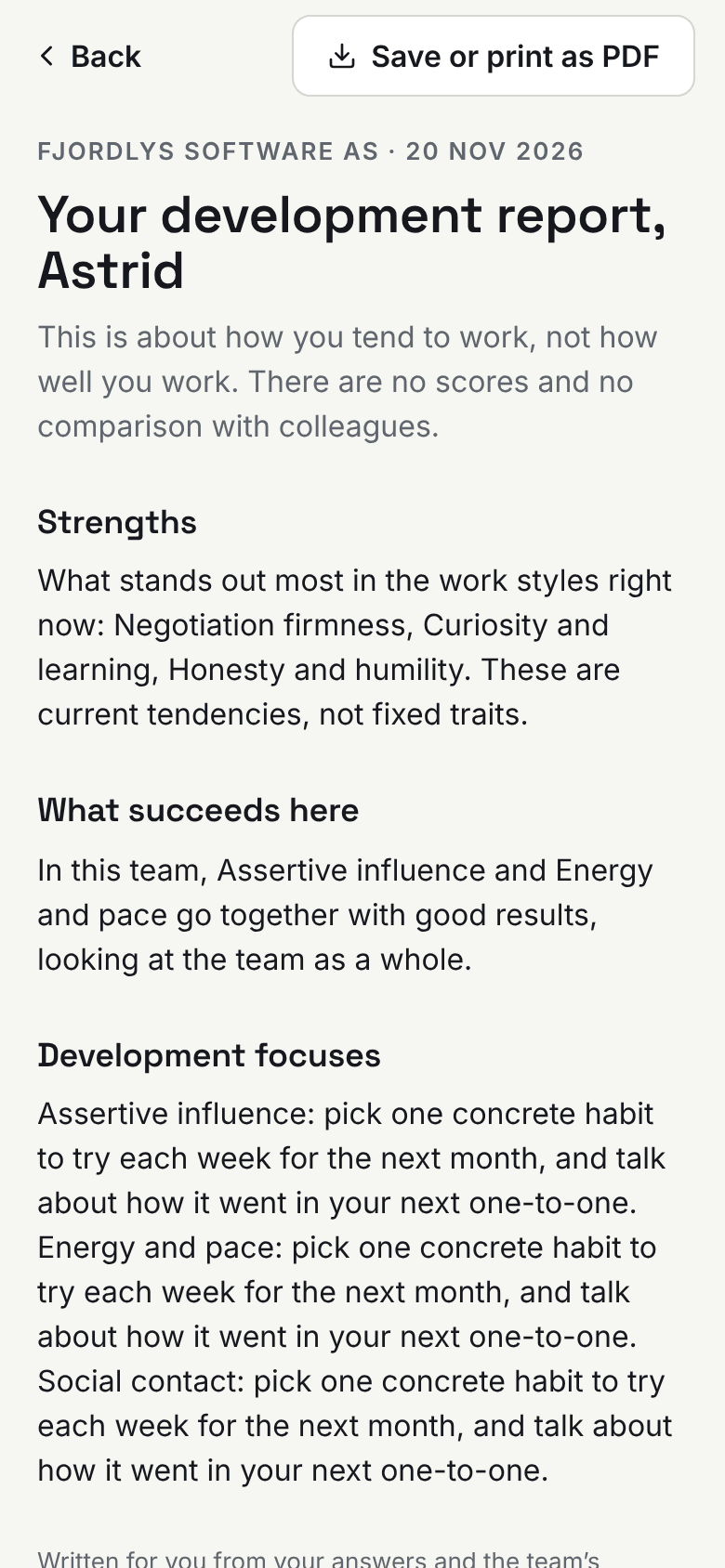
A salesperson's own development report on a phone: strengths, what succeeds in this team and what to focus on next.

Step 2 · Add your numbers

The Data Coach checks your sales data before anything is calculated

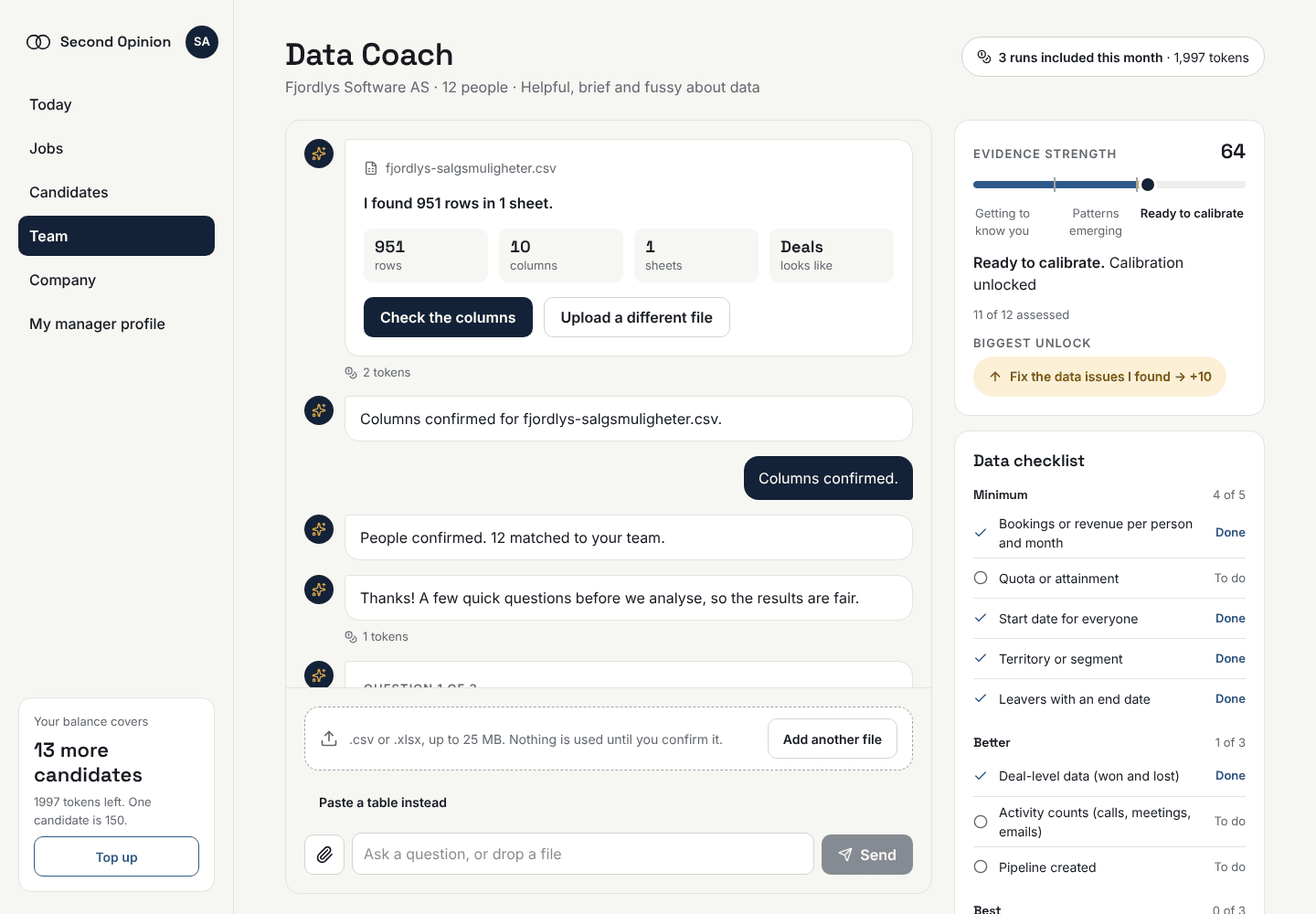
Drop in a CRM export as CSV or Excel. The Data Coach reads it, maps the columns, matches people to your team and asks about anything that would make the results unfair, such as a big deal on an inherited account, parental leave or a new starter still ramping up. Nothing is used until you confirm it.

  • A checklist shows what you have and what would make the evidence stronger
  • Every data decision is listed and can be undone
  • The raw file is deleted after 30 days; only what you confirmed is kept
The Data Coach: a file summary with rows and columns, the conversation, Evidence Strength and the data checklist.

Step 3 · Learn

What winning looks like in your team, next to what research expects

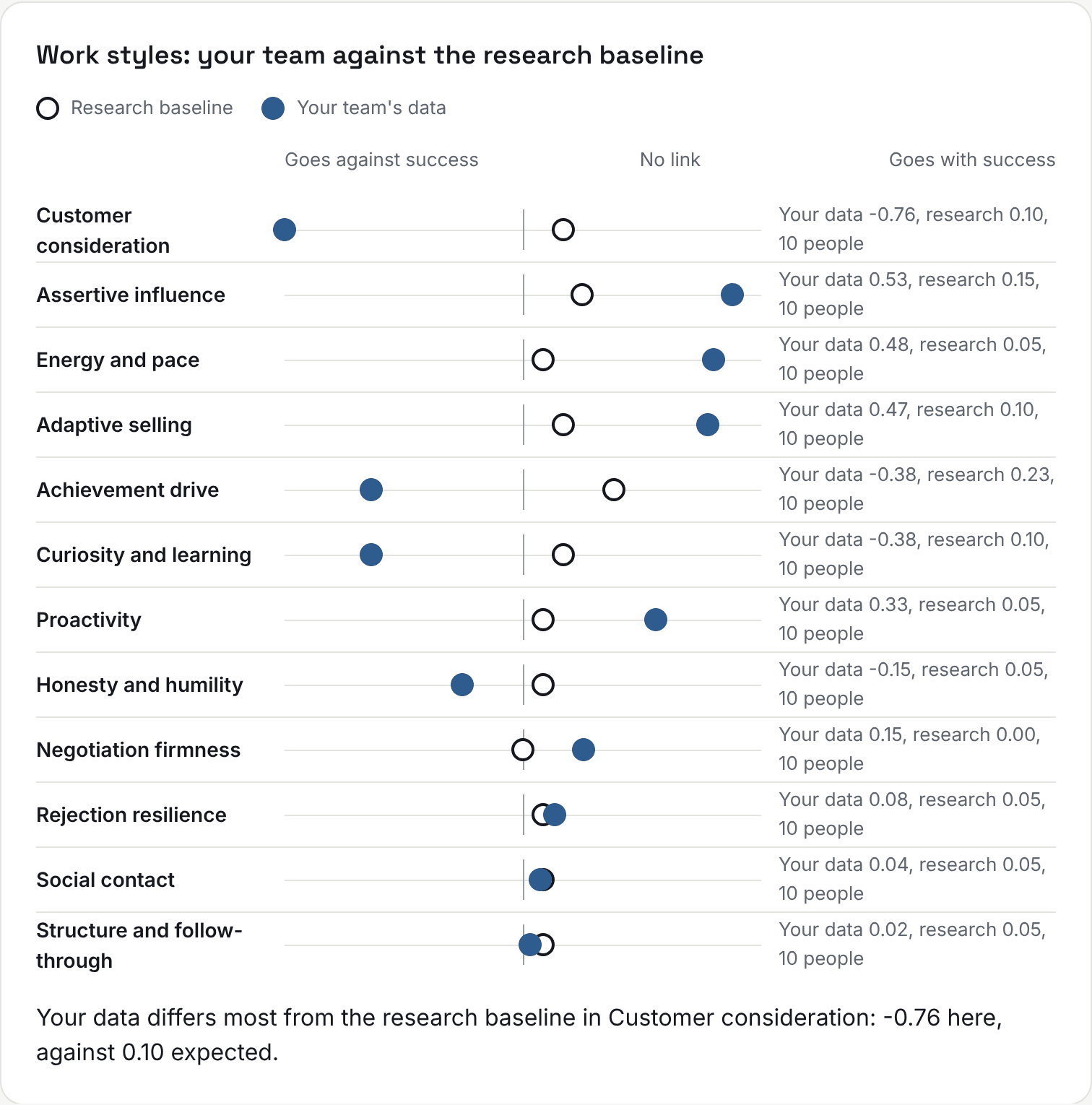
You decide what success means for the role, for example bookings, win rate and average deal size. Team then shows how each of the twelve work styles goes with success in your team, set against the research baseline, with the number of people behind every figure.

  • Associations, not causes, and labelled as such
  • A plain confidence label on every conclusion
  • Phases of the sales process shown in process order, not ranked
A chart of twelve work styles: the research baseline as an open circle and the team's data as a filled dot, from 'goes against success' to 'goes with success'.

Step 4 · Person or patch

Circumstance is not mistaken for skill

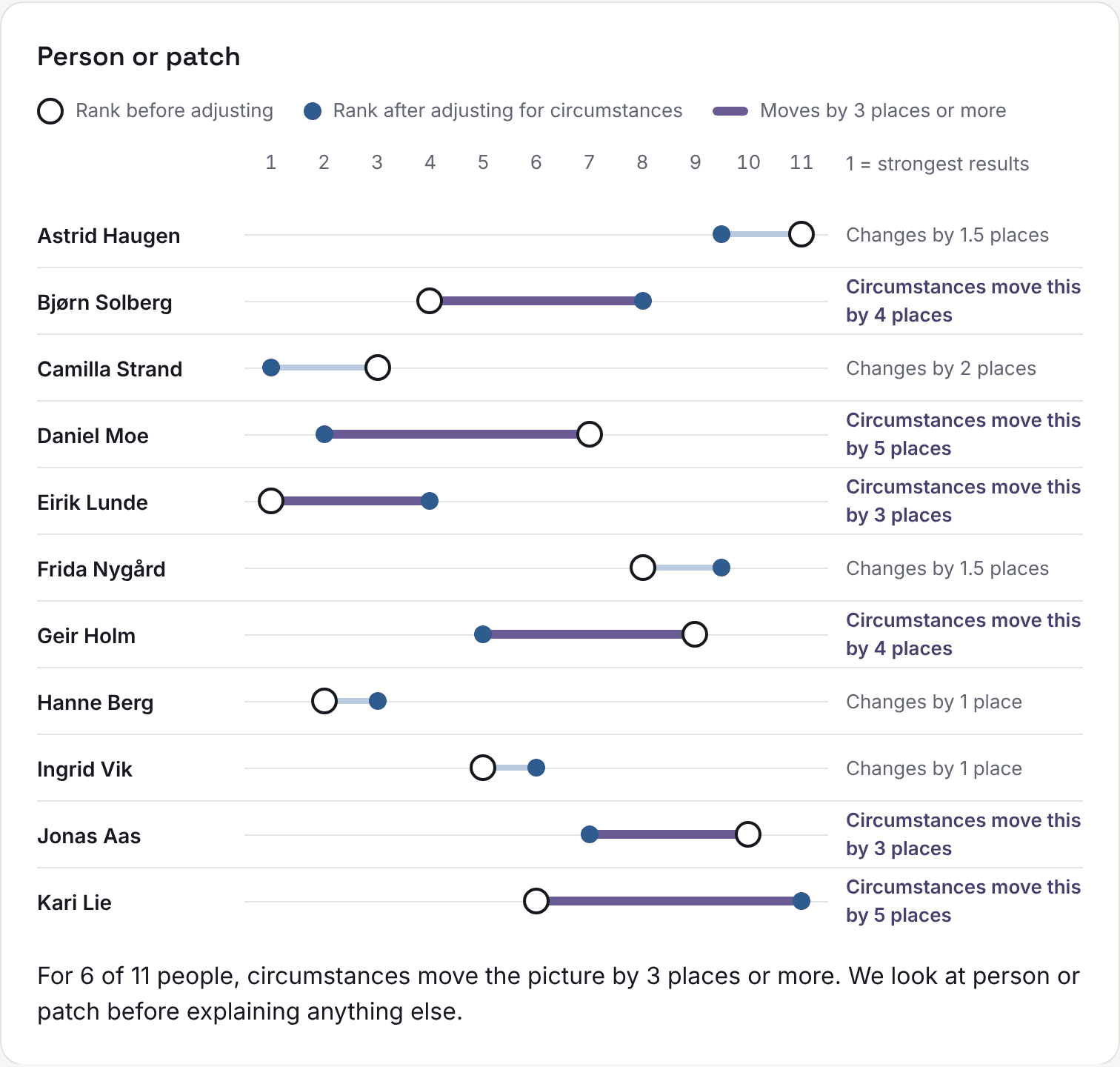
Before explaining anything, Team checks how much territory, inherited accounts and leave move the picture. When circumstances move someone's results by three places or more, you see it, and the explanation that follows is based on the adjusted results.

  • Rows are alphabetical, never a leaderboard
  • Ranks describe how much circumstances matter, not what a person is worth
The person-or-patch chart: each person's rank before and after adjusting for circumstances, with the larger moves highlighted.

Step 5 · Develop

A development report for every person, and a guide for your one-to-one

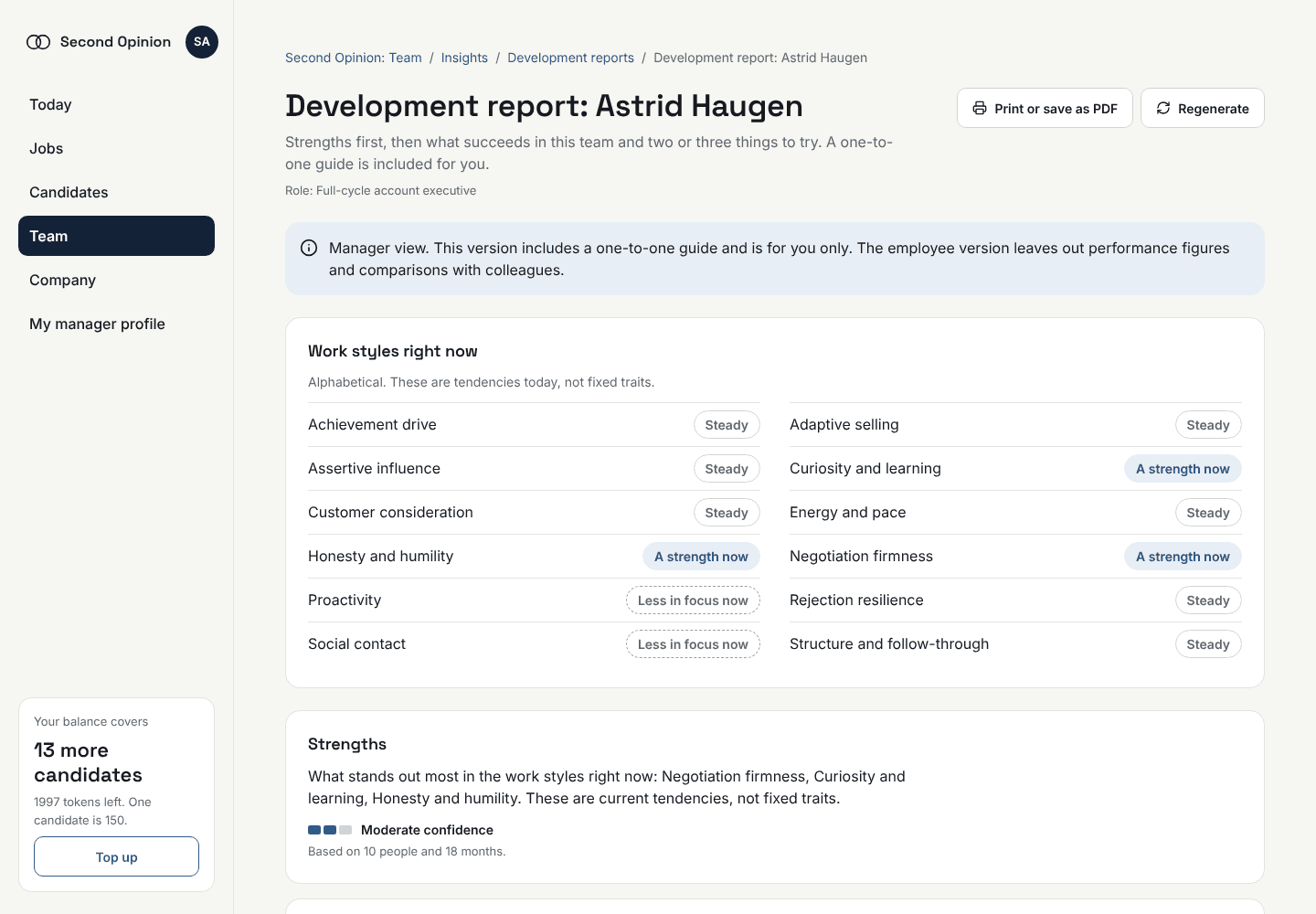
Each person's report starts with their strengths, then what succeeds in this team and a few habits to try. You get the same report with a guide for the conversation. The employee version never shows performance figures or colleagues.

  • Work styles described as tendencies right now, not fixed traits
  • Print or save as PDF for the one-to-one
A manager's development report: work styles marked as a strength now, steady or less in focus now, followed by strengths.

Step 6 · Hire better

Careful changes to your hiring profile, and you decide each one

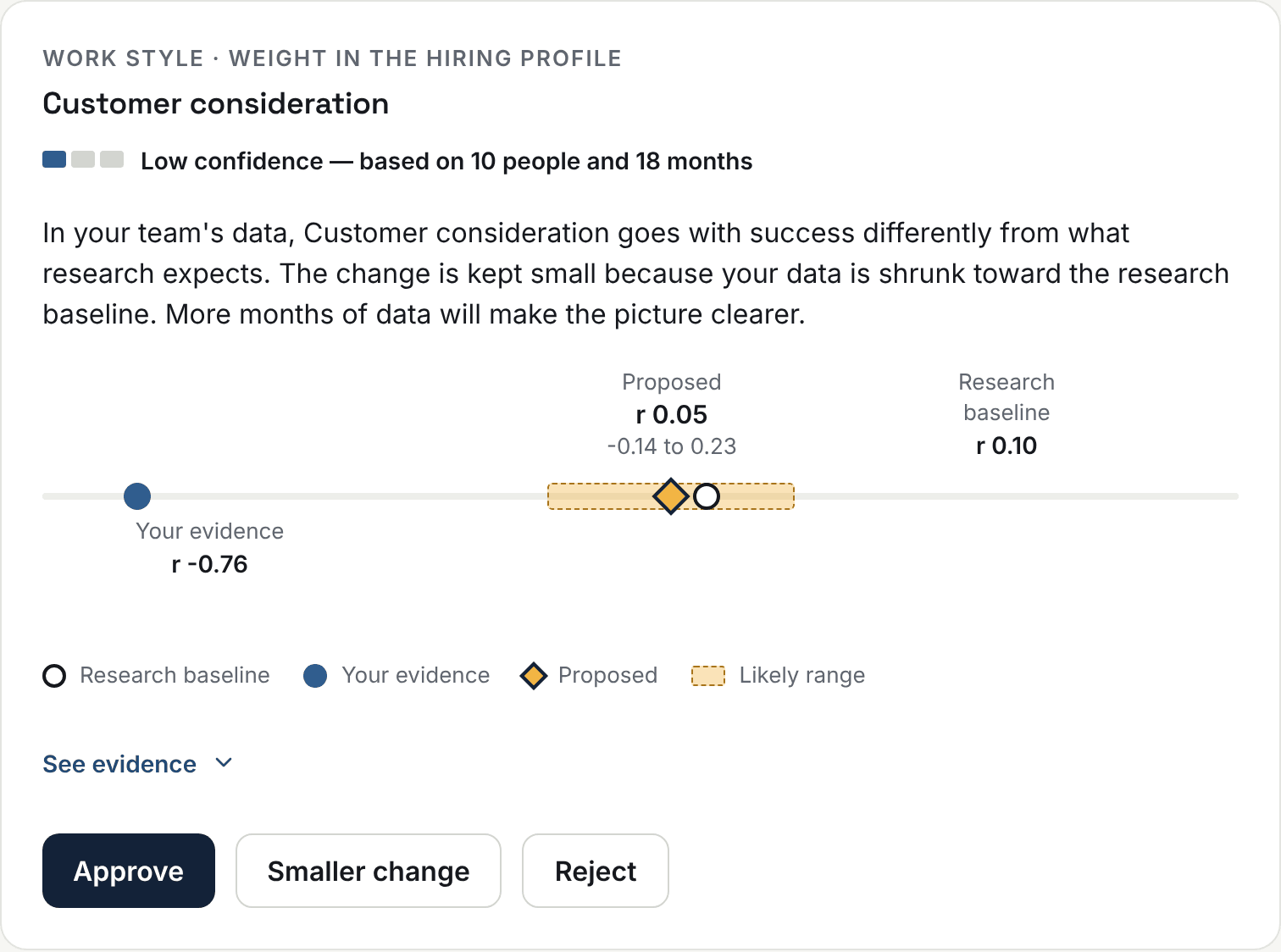
When the evidence is strong enough, Team proposes small changes to how candidates are scored. Each card shows where research starts, what your data says, what we propose and the likely range. You approve it, make it smaller or reject it.

  • At most three changes at a time, each capped at 15% a cycle and 40% in total
  • Your data is pulled towards the research baseline, more so the smaller the team
  • Every version is kept and any one can be restored; candidates already scored keep their version
A proposed change for one work style: your evidence, the research baseline, the proposed weight with its likely range, and Approve, Smaller change and Reject.

Step 7 · Improve

Sharper as the evidence grows

Add numbers as you go and follow each new hire at 3, 6 and 12 months. The Evidence Strength meter shows how far your own data can be trusted and what would raise it most. Once there are enough hires, you see how predictions held up in your company.

Month 1

Evidence Strength22

Getting to know you. We show how people tend to work

Your team has answered. You see how people tend to work.

Month 4

Evidence Strength44

Patterns emerging. Associations shown, with honest labels

Sales numbers added. Patterns appear, each with a confidence label.

Month 8

Evidence Strength71

Ready to calibrate. Careful changes can be considered

Enough evidence to consider changes to your hiring profile. We only propose one when your data clearly supports it.

Privacy and fair use

Built so it cannot quietly become a ranking tool

  • Never for decisions about someone's jobEvery report carries the line: for development and calibration only, not for dismissal, retrenchment or disciplinary decisions. You agree to this when you switch Team on.
  • Names stay with youPeople are pseudonymised before any AI model sees anything. Names are stored encrypted, numbers are calculated by our own code, and the model only writes the explanation.
  • Staff are told, and keep their rightsActivation includes the staff notice for your country. Everyone sees their own report and can ask for access, object or ask for deletion.
  • Small teams get honest answersWe correct for testing twelve work styles at once and show wide ranges. When the evidence is thin, we say "not enough yet" and tell you what would help.

An honest line about small teams

With a small team we move carefully, and say so.

In a team of ten or twenty, patterns can easily be chance. So we start from the research, move only as far as your evidence allows, show wide ranges and a plain confidence label on everything. Often the honest answer is "not enough yet", and we tell you what would help. Calibration on your own data mostly becomes possible with larger teams or more history.

Add-on

Second Opinion: Team

€149a month

Add to any plan

Learn what winning looks like in your own sales team, and hire against your own evidence.

Try it free

  • Turn Team on and set it up
  • Test up to 3 people
  • The Data Coach checklist and the Evidence Strength meter

The add-on adds

  • Analysis of your sales numbers and a report for each person
  • Calibration proposals for your hiring profile
  • 1 recalibration cycle a month included; 4 on the Business plan
  • Extra analysis uses credits, and you see the estimate first

Questions we get

Who sees what?

Each person sees their own development report. You see the same report with a guide for your one-to-one. Nobody sees anyone's individual answers, and the employee report never shows performance figures or colleagues.

How long does it take?

Switching Team on takes a few minutes. Each person spends about twenty minutes on the questionnaire. Uploading a CRM export and answering the Data Coach's questions usually takes under an hour. Patterns need sales numbers covering a few months.

What data do we need?

At minimum: bookings or revenue per person and month, start dates, territory or segment, and leavers with an end date. Quotas, deal-level data and activity counts make the evidence stronger. The Data Coach checklist shows where you stand.

Is it allowed where we work?

Activation gives you the staff notice and checklist for Norway, and a general version for the rest of the EU and elsewhere. South Africa is coming soon. These are drafts, not legal advice: check with your adviser.

How big does the team need to be?

Any size can use the development reports and the Data Coach. Calibrating your hiring profile on your own data needs more people or more history; with ten or twenty people the honest answer is often "not enough yet", and we start from the research instead.

Does it cost extra?

Yes, as an add-on to any plan: Second Opinion: Team is a monthly subscription. You can try it free first, with up to 3 people tested. The add-on includes one recalibration cycle a month, and anything beyond that uses credits, with the estimate shown first.

Do my staff's names go to an AI model?

No. People are pseudonymised before any model call, numbers are computed by our own code, and the model only writes the explanation.

Find out what winning looks like at your company.

Start free. Switch on Team when you are ready, and bring your team along at your own pace.